
Antivirus 2011 (also known as AntiVirus 2011) is not a legitimate anti-spyware as you may think. AntiVirus 2011 is a rogue anti-spyware which is designed to fool you, trustful PC users, into taking it serious and then steal your money. Haling from a new generation of spywares, program offers for victims to use some basic its functions and then announces numerous infections detected after running a full system scan. Further, Anti-Virus 2011 will keep telling that its unregistered version can’t remove these threats from your computer and will ask purchasing “licensed” its version for fixing everything. That’s how Anti-virus 2011’s brainwashing campaign ends. Don’t feel comfortable after noticing any of its traces because only Anti-Virus 2011 is the virus which must be removed for good.
In general, Anti-Virus 2011 is infiltrated with the help of trojans viruses that look for security holes and after finding some download all the data needed. Then, the same Trojan makes useful configurations to help this roguware launch automatically once the computer boots up and easily display fake system scanners and pop-up ads of its own. Anti-Virus 2011 generates only misleading information about hundreds of spyware detected trying to make users concerned about their PCs. They are completely bombarded by tons of popup ads also reporting “dangerous threat” and finally recommended fixing everything with the “full” its version. Of course, people are misguided about the way how they can remove “detections”. Anti-Virus 2011 will ask people first purchase its commercial version and, moreover, will make some redirections to its official websites for getting a payment much faster.
Anti-Virus 2011 can’t help its victims because there is nothing what needs to be fixed. The only aim of this malware is to rip people off, so delete this application and you will save your money and computer as well. Moreover, hackers may also steal your credit card details, so please contact your credit card details to save your data. While tying to remove Anti-Virus 2011, start Safe Mode with Networking at the beginning of the procedure and then stop its processes and delete the files of this malware for good.
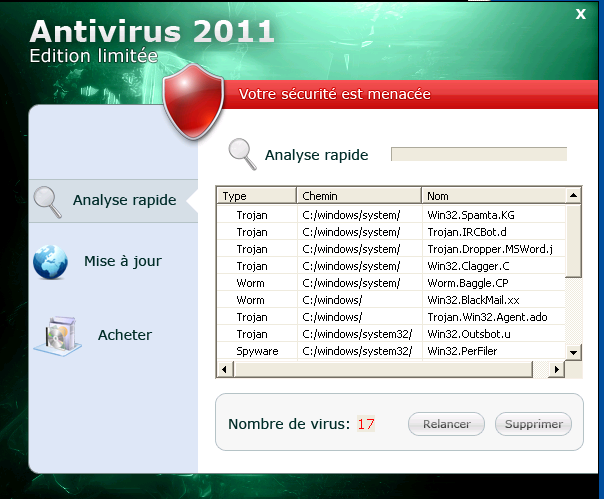
UPDATE!!! A new version of Antivirus 2011 rogue anti-spyware has been noticed these days. This time this scareware can be found in French language and presented as Antivirus 2011 Edition limitée. Choosing the language according to Operating System found on the targeted PC, this updated version of AntiVirus 2011 will also display numerous of alerts that will report imaginary viruses:
Win32.Spamta.KG
Trojan.IRCBot.d
Trojan.Dropper.MSWord.j
Win32.Clagger.C
Worm.Baggle.CP
Win32.BlackMail.xx
Trojan.Win32.Agent.ado
Win32.Outsbot.u
C: / windows/system32 /
Win32.PerFiler
Win32.Miewer.a
Spy.Agent.g
Win32.Peacomm.dam
Backdoor.Jix.b
Trojan-PSW.Win32
Trojan.IRCBot.c
Worm.Stuxnet.c
Win32.Zeus.d
After some research it was found that Antivirus 2011 Edition limitée will close any new application that you will try to open with a reason to protect itself from being removed. However, it fails to run in safe mode, so in order to uninstall Antivirus 2011 reboot your computer into Safe Mode first by starting to click F8 key as soon as Windows logo appears. Additionally, download spyhunter anti-spyware and remove Antivirus 2011 Edition limitée.
Automatic Malware removal tools
(Win)
Note: Spyhunter trial provides detection of parasites and assists in their removal for free. limited trial available, Terms of use, Privacy Policy, Uninstall Instructions,
(Mac)
Note: Combo Cleaner trial provides detection of parasites and assists in their removal for free. limited trial available, Terms of use, Privacy Policy, Uninstall Instructions, Refund Policy ,
hello… i accedentally downloaded that stupid anti-virus program… i thot it was suspicous when i tredto sign into msn and itsaid thre is anew version of msn and you need to upgrade to continue… so i was likewtf… and i clicked k… now like a week later(today) it sarted its pop ups… and then my pc is all slow and crappy… ios actualy a netbook…i tried to delete it.. and it didnt work… jst kept messing up… and i dunno… i didnt have an antivirus… so i downloaded the new avg and it right away started detectig the malware stuff…so i blocked them all and moved to the vault… now it realy isnt here…but i dunno next time i restart if it will be back… i cant even start the task manager…it sid task mngr was dissabled by administrator… wich i know is fucked… i did a root kick scan n it sai no probs… but my avg isnt workig… what can i do? i am soo confused
Alexandria:
Scan with TDSS Killer first, also try launching other anti-malware programs. AVG is not that good against them.
Then check this guide: http://www.2-viruses.com/how-to-enable-task-manager-and-registry-editor-after-malware-attack
This virus killed my laptop. When trying to desinstall it I had to enter a code (a very log string). It said that antivirus 2011 wasn’t completely removed, that my laptop dhad become a spamsender, that the police would be notified. I rebooted a couple of times and “BLANK” Mij laptop doen’st even want to start up anymore. Broke, dead, lost thousands of info.
I did a system restore from safe mode to an earlier date. Seems to have done the trick!
Boot the infected computer in safe mode with networking,
go online and download MalwareBytes
Install, update, and run FULL scan. Reboot when done.
Restart windows normally
Run MalwareBytes again.
I have a problem while trying to start in safe mode or safe mode with network.
it seems to froze wile iniciating and it never start windows.
I am concerned, how can I stop the malware or make safe mode work?
i never installed it i removed all of it off of my computer and it still keeps poping up on my computer.. i dont like the fact that it installed itself onto my computer without my promission
I fell for the AntiVirus 2011 scam and they got my money, I think it was about $60.00. Is there any way for me to get my money back?
M. Badtoe : contact the bank
How do I get thier IP??? I want to ping the crap out of them day and night
i did this by accident on a work computer. how do i get rid of it????
The only way I have found of removing the latest incarnation is to do the following.
1 – remove hard drive from infected PC
2 – take hard drive to a second, non-infected, PC and connect as secondary drive. I have an ide/sata to usb adapter so I can hook it up externally and then just plug it in to the usb port.
3 – make sure the second PC has the latest free Malwarebyes software (www.malwarebytes.org)and clean the infected hard drive from there.
4 – put cleaned drive back in original PC and it should be ok.
Actually, XP/Vista/7 Anti-Virus 2011 is far easier to remove. The guide for them is here : http://www.2-viruses.com/remove-win-7vistaxp-anti-virusantispywaretotal-securityinternet-securityhome-security-security-2011 .
download a virus detecting program
good ones will locate the viruses.
write down locations.
remove all virus software.
reboot into windows protected mode with f8 key
or boot from a disk.
manually remove virus in locations.